
How to opt out of ZoomInfo
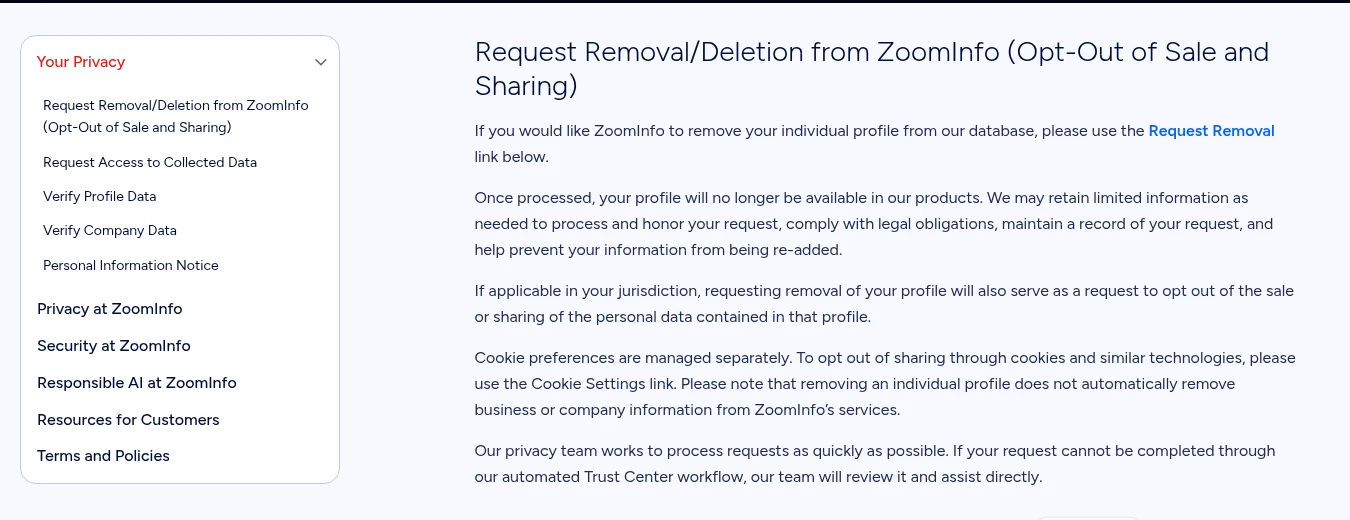
1. Open the removal page
Use the official link below to open ZoomInfo's Request Removal page.
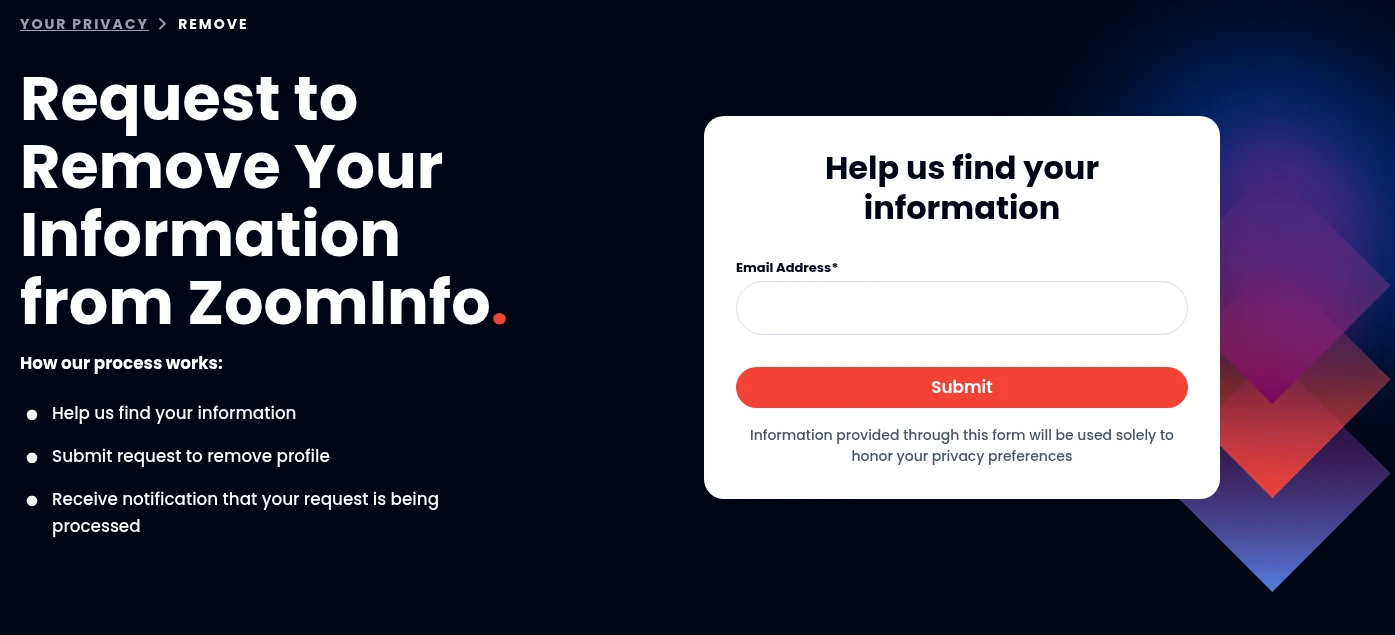
2. Enter your email
Use an email address you can access that relates to your profile. Select Submit and complete any reCAPTCHA check shown.
3. Complete your request
Follow the live form's instructions to verify and complete your request. Check that messages come from ZoomInfo and keep verification codes private.

4. Save and check the outcome
Save the response and request date. Once ZoomInfo says it has processed your request, check any profile URL you already know.

What happens next
Wait for ZoomInfo's response. Its official guidance does not give a fixed processing deadline on the pages we inspected.
Check your known profile URL against that response. A blocked page or temporary error alone is not proof of deletion.
Check search results separately. A Google result or cached snippet may differ from the underlying profile, and a ZoomInfo request does not remove copies held elsewhere.
Keep your records and check again if the profile reappears. Limited retention to help prevent re-addition is not a guarantee that every copy disappears.
What removal covers
ZoomInfo provides information about professionals and companies. This guide covers removing an individual profile, not claiming or updating it.
- Your individual profile
- ZoomInfo says a processed request makes your profile unavailable in its products. Where applicable, removal also opts you out of sale or sharing of the personal data in that profile.
- Company information
- Your company's information is separate. Removing your personal profile does not automatically remove a company page or business information.
- Cookies and retained information
- Cookie preferences use separate Cookie Settings. ZoomInfo may keep limited information to honor the request, meet legal obligations, record it and help prevent re-addition.
Having trouble?
The page will not load
Start from ZoomInfo's Manage Your Personal Privacy page and choose Request Removal, or try a current browser later. Do not bypass an access challenge or pay to unlock the form. A blocked page is not a completed request.
You cannot complete verification
Use the current privacy-request options on ZoomInfo's official page. Its privacy team reviews requests that cannot be completed automatically. Do not guess codes or use someone else's details.
Your profile is still visible
Check whether the response says received, processing or completed. If it says processed but your individual profile remains, keep the URL and request record for a follow-up through the official route.
You want company or cookie changes
Use the separate company-data options or Cookie Settings on the official privacy page. A personal-profile removal request does not automatically change either.
ZoomInfo opt-out FAQs
How do I ask ZoomInfo to delete my information?
Use the official Request Removal page at privacyrequest.zoominfo.com/remove/verify. Enter your email, follow the live instructions and keep the response so you can check the outcome.
Do I need to pay to use this guide?
No. The guide and official removal link are available without a login, email capture or purchase. Protect My Data plans are an optional alternative.
How long does a ZoomInfo opt-out take?
The official guidance inspected on 6 October and rechecked on 7 October 2026 does not state a fixed deadline. Wait for ZoomInfo's response rather than assuming removal is immediate.
Does ZoomInfo require a phone number or an email code?
The public starting screen asks for an email address. Later screens were not tested, so we cannot confirm a phone-number or code requirement. Follow the live official form.
Will removing my profile remove my company's page?
No, not automatically. Individual-profile removal and company-data controls are separate.
Does removal delete every piece of data ZoomInfo holds?
Not necessarily. ZoomInfo may retain limited information for the purposes described above. Cookie preferences are separate.
Will a ZoomInfo opt-out remove me from Google or other brokers?
Not automatically. Search results and other brokers' records are separate sources. Check the underlying pages and address other sources separately; no Google-delisting deadline was verified.
Sources and method
By Protect My Data editorial team Prepared Updated
- ZoomInfo: Manage Your Personal PrivacyOfficial removal link, profile scope, retention, cookies, company-data separation and privacy-team review. Inspected 6 October 2026; public guidance rechecked 7 October 2026.
- ZoomInfo: Request to Remove Your InformationPublic first screen: email field, Submit button, privacy-preference notice and process outline. Inspected 6 October 2026 without submission; public first-screen text rechecked 7 October 2026.
Public pages and screenshots inspected on 6 October 2026; guidance and starting-screen text rechecked on 7 October. No request was submitted or verification message triggered. Later screens and removal outcomes were not tested. Original artwork is conceptual, not evidence of deletion. Check the current official form before providing information.
Quick calculator
What does doing it yourself cost?
Adjust the numbers to see how repeated opt-out work could add up over a year. This is an illustrative personal estimate in US dollars.
Illustrative only. It does not measure removals, show plan savings or guarantee any result.
How this is calculated
hours = brokers x minutes per request x times per year / 60; value = hours x value of one hour